Add storage, video conversion hours, and team members whenever you need them
1787040000000
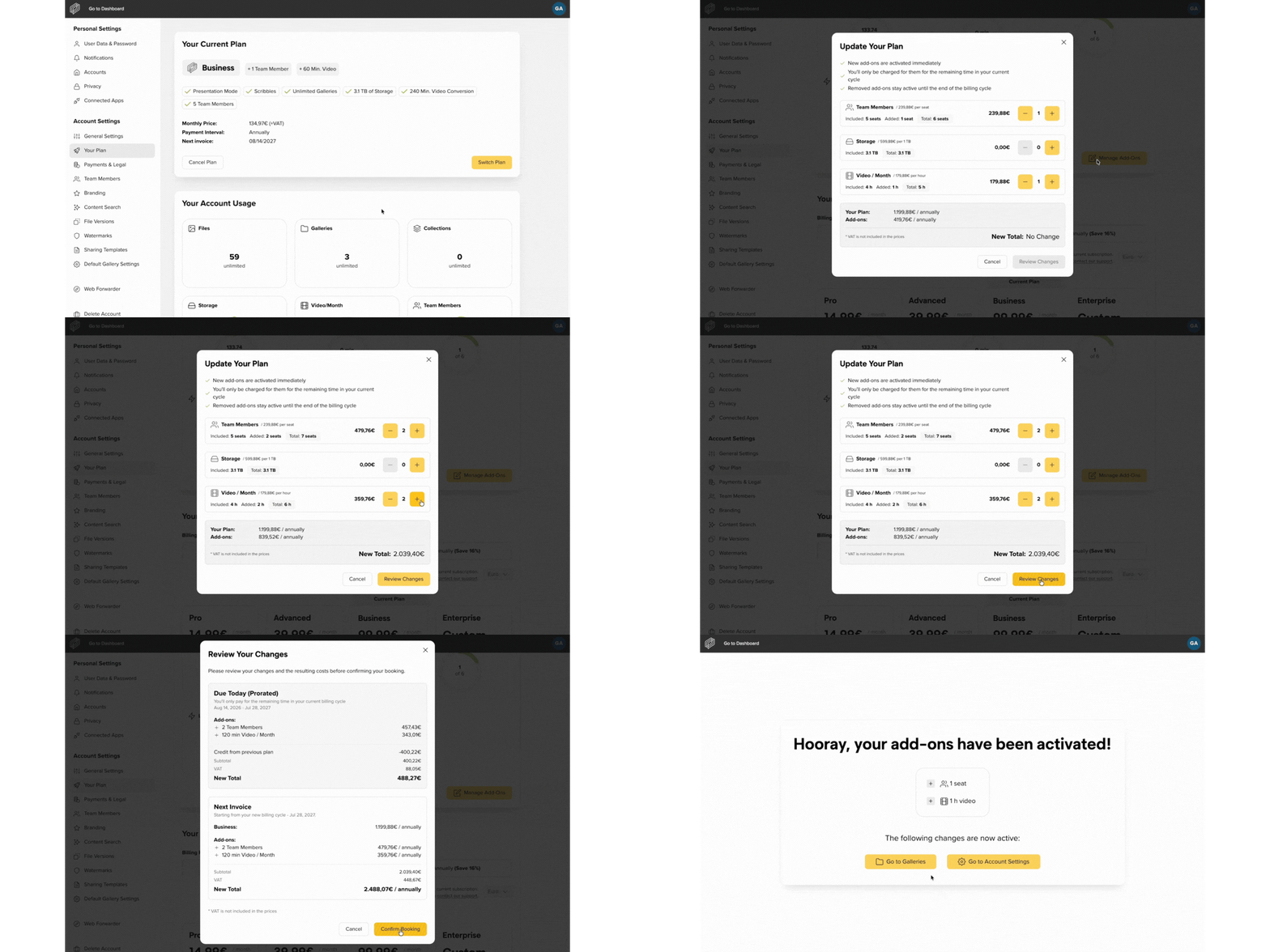
If you or your team need more capacity, you can now add the right add-ons directly from your picdrop account.
Go to your Account Settings, open Your Plan, and select Manage Add-ons under Your Account Usage. From there, you can add extra storage, additional video conversion hours, or, depending on your plan, more team members.
You can increase your storage to up to 750 GB on Pro, 2.5 TB on Advanced, and 4 TB on Business. With the Enterprise plan, you can expand your storage in individual 1 TB increments.
You can also add additional video conversion hours if you need to process more videos each month.
Additional team members are available on the Advanced and Business plans. Advanced includes 2 team members, with up to 2 more available as add-ons. Business includes 5 team members, with up to 4 more available. If you need space for a larger team, the Enterprise plan offers more flexibility.
Add-ons are activated immediately after confirmation, so you can start using your new limits right away.
More information about prices and available add-ons can be found here.
Did you like this update?


Leave your name and email so that we can reply to you (both fields are optional):